Four-step install
agent-ready
1. Create the Framer bridge
Run this once so your AI agent can safely read and edit the current Framer project.
npx @framer/agent setup
2. Add the First Rank Pro skill
Choose your operating system, copy the command, run it, then restart your agent so the skill loads.
macOS / Linux
mkdir -p ~/.claude/skills/first-rank-pro-referee && curl -fL -o ~/.claude/skills/first-rank-pro-referee/SKILL.md https://raw.githubusercontent.com/arun-dev-des/FirstRankPro/main/SKILL.md
Windows (PowerShell)
New-Item -ItemType Directory -Force $HOME\.claude\skills\first-rank-pro-referee | Out-Null; curl.exe -fL -o $HOME\.claude\skills\first-rank-pro-referee\SKILL.md https://raw.githubusercontent.com/arun-dev-des/FirstRankPro/main/SKILL.md
3. Open any CLI tool of your choice and enter this command
Paste this inside any CLI tool of your choice
/framer
4. Copy the project link from Framer Homepage and Paste in CLI
Open Framer Home, Copy Project Link, then paste the project link in CLI
5. Ask for the audit loop
Use this prompt to audit, fix, publish, and verify the score improvement in one loop.
“Audit this page’s SEO”
“Fix the failing checks”
“Publish and prove the climb.”
Claude Code
Cursor
Gemini CLI
Windsurf
Claude Code
Cursor
Gemini CLI
Windsurf
Enter any published Framer page for an instant, deterministic SEO, GEO and EEAT — no signup, no focus keyword.
Same page, same score, every time. Then install the agent above to fix the failing checks.
Every check, fully deterministic
Same page, same result — no LLM, no network beyond fetching the page. Classic checks are table-stakes SEO; GEO and E-E-A-T grade optimization for AI search that most tools don’t touch.
Classic SEO
9 checks
Foundational on-page SEO — the table-stakes checks every page should pass.
Main Keyword
A focus keyword is set for the page
medium
Page Title
Title present & descriptive (not just the page name), ~under 60 chars
high
Page Description
Meta description present, ~under 160 chars
high
H1 Heading
Exactly one H1 on the page
high
H1–H6 Hierarchy
Logical heading order, no skipped levels
high
Keyword Placement
Focus keyword appears in title, meta, and H1
high
Image Alts
≥80% of images have alt text
medium
Content Length
Enough real content (≥300 words; flags thin or bloated)
low
Structured Data
Valid JSON-LD (Organization / Article / FAQPage)
high
GEO · AI-citability
4 checks
How readily ChatGPT, Perplexity and AI Overviews can quote you.
Passage Chunk Length
Paragraphs broken into citable ~40–200-word passages (no wall-of-text)
medium
Direct-Answer Structure
Lists/tables + question-style headings with concise answers
medium
Citation & Attribution Density
Outbound citations to 2+ authoritative domains (~1 per 1k words)
medium
AI-Citable Schema
FAQPage / QAPage / Article / Organization JSON-LD that answer engines cite
high
E-E-A-T · trust
3 checks
Experience, Expertise, Authoritativeness and Trust signals.
Secure Connection
Page served over HTTPS
low
Authorship & Freshness
Author + publish/update date declared
medium
Contact & Trust Affordances
Contact link or Organization contact schema present
medium
A scoring engine finds the failing checks across SEO, GEO and E-E-A-T. Your AI agent fixes them inside Framer, publishes, then re-audits the live page.
Audit any page
Score any live Framer URL 0–100 with a deterministic engine: char counts, heading checks, keyword placement, alt coverage, JSON-LD.
Fix the failing checks
The agent rewrites your page title, meta description, H1, fixes heading hierarchy, and adds image alt text — in Framer.
Prove the climb
Re-audit the published page and show the before→after score with per-check receipts. The grader is independent of the editor.
Structured data (JSON-LD)
Grades Organization / Article / FAQPage schema — depth most tools skip. Adding it is a quick Site Settings step.
Optimize a whole CMS at once
Set a templated title across a collection — metadata.title = ‘{{Title}} — Brand’ — and the engine grades every page.
Image alt text at scale
Bulk-caption content images and mark decorative icons empty; the engine verifies coverage crosses 80%.
Answer engines (GEO)
Optimizes for AI answer engines — clear definitions, structured facts and schema so ChatGPT, Perplexity and Google AI Overviews can cite your page.
E-E-A-T signals
Grades trust signals — author bylines, organization schema, citations and freshness — so pages read as experienced, authoritative and trustworthy.
The agent runs a tight optimize→publish→prove loop across SEO, GEO and E-E-A-T, with the scoring engine outside the editor path.
01
Audit — score + fix list
02
Agent applies the fixes in Framer
03
Publish
04
Re-audit
05
Receipts: before → after
Two receipts: the agent’s change log (what changed) and the engine’s independent score (that it worked).
On firstrankpro.com the agent fixed keyword placement, structured data and E-E-A-T signals — tuning the page for search and AI answer engines alike; the engine graded the live result — 93, the same on every re-run. It even caught the agent claiming it added structured data when it hadn’t reached the page. Proof, not a promise.
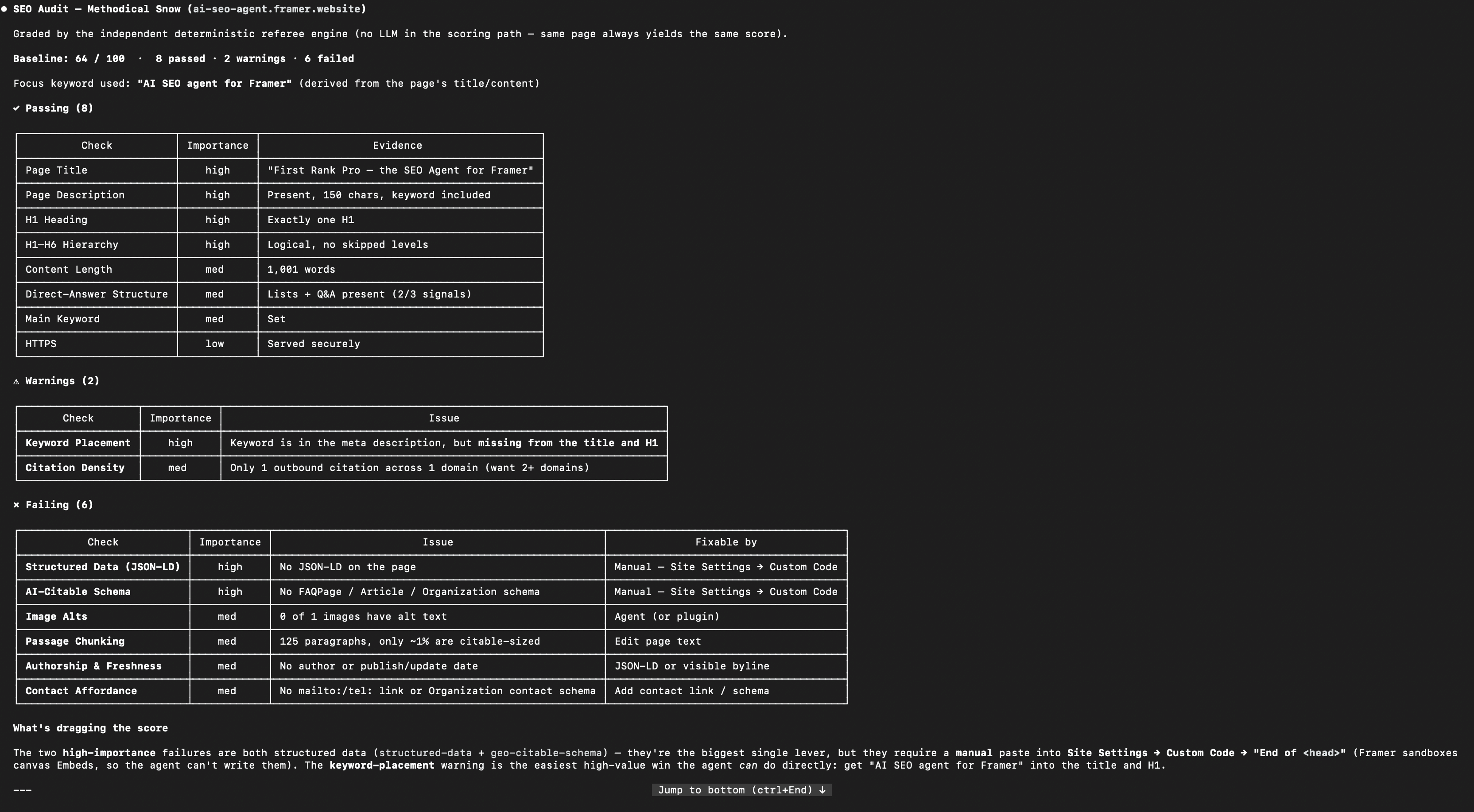
Deterministic audit — 8 passed · 2 warnings · 6 failed

Before → after, re-audited on the live URL — 64 → 72
AGENT SPECIFICATION
SKILL.md — read the full spec
The exact, unedited instruction set the First Rank Pro SEO agent runs on. Scroll the block below to read it end to end.
---
name: first-rank-pro-referee
description: >-
Optimize AND prove SEO on a Framer site. Use this when a user asks to improve,
audit, or fix the SEO of a Framer page (or a whole CMS collection), or to show
that an SEO change actually worked. It runs a deterministic scoring engine (an
independent “referee”) that grades a page 0-100 and returns a directly
executable fix worklist — each item mapped to the exact Framer Agent DSL
operation that applies it. The Framer Agent WRITES the SEO via the DSL; this
engine MEASURES, GRADES, and PROVES the before→after climb with receipts.
---
# First Rank Pro — the SEO Referee
The Framer Agent can write most of the SEO stack through its DSL — per-page
`metadata.title` / `metadata.description`, heading tags via `SET … tag="h1"`, image
alt text via `SET … altText="…"`, page text, redirects, CMS CRUD, and
`framer.agent.publish(...)`.
The one piece it can’t write itself is JSON-LD / custom `<head>` code — that lands
via a manual Site Settings step (see Step 2). And what it can’t do *at all* on its
own is prove the result moved the needle: there is no number, no independent grade.
This skill adds exactly that.
The engine is **rule-based — no LLM in the scoring path**. The same page always
produces the same score. That is what makes a before→after climb *proof* rather
than a self-report: **the grader is independent of the editor.**
Two complementary receipts make the demo airtight:
- **`framer.agent.reviewChanges()`** — the agent’s own structured diff
(inserted / updated / appliedWithIssues + warnings) = *what was changed.*
- **This engine’s score climb** — independent, deterministic = *that it worked.*
## The tool: `POST /api/audit`
```
POST https://first-rank-proxy.vercel.app/api/audit
Content-Type: application/json
{ “url”: “https://your-site.framer.app/page”, “focusKeyword”: “your target keyword” }
```
- `url` (required): the **published, live** URL to grade. The engine fetches live
HTML, so edits must be **published** (`framer.agent.publish(...)`) before they show up.
- `focusKeyword` (recommended): the keyword the page should rank for.
**How to call it.** This is a plain HTTP endpoint — call it from your shell with
`curl` (NOT a Framer DSL op):
```bash
curl -s -X POST https://first-rank-proxy.vercel.app/api/audit \
-H ‘Content-Type: application/json’ \
-d ‘{“url”:”https://your-site.framer.app/“,”focusKeyword”:”your keyword”}’
```
Parse `score` and `checks[]` from stdout. Same `curl` for Step 0 (baseline) and
Step 5 (re-audit). The alt-text vision endpoint (`/api/generate-alt-text`) is called
the same way.
### Response
```jsonc
{
“url”: “…”, “focusKeyword”: “…”,
“score”: 62, // deterministic 0-100 (illustrative pre-fix baseline)
“summary”: { “pass”: 11, “warning”: 2, “fail”: 3, “total”: 16 }, // 16 checks total
“checks”: [
{
“id”: “page-title”, “name”: “Page Title”,
“status”: “fail”, // pass | warning | fail
“importance”: “high”, // high | medium | low
“category”: “technical”,
“reason”: “Page Title is missing”, // deterministic ‘why’
“evidence”: “No Page Title found”, // the actual data found
“fixInstruction”: “Set the per-page metadata.title …”,
“framerAgentOp”: “metadata.title (per-page)”, // the exact DSL op
“writableBy”: “framer-agent” // framer-agent | firstrankpro-plugin
}
// … one entry per check
],
“engine”: “first-rank-pro/deterministic”
}
```
### Checks → Framer Agent DSL operation
| check id | grades | `framerAgentOp` |
|----------|--------|-----------------|
| `main-keyword` | a focus keyword is set | analysis input |
| `page-title` | title present, not just the page name | `metadata.title` (per-page) |
| `page-description` | meta description present | `metadata.description` (per-page) |
| `h1-check` | exactly one H1 | `SET <id> tag="h1"` |
| `hierarchy-check` | logical H1→H6, no skipped levels | `SET <id> tag="h2"/"h3"…` |
| `keyword-placement` | keyword in title, meta, and H1 | title + description + H1 `text` |
| `image-alts` | % of images with alt text | `SET <id> altText="…"` |
| `content-length` | ≥ 300 words of real content | edit page text |
| `structured-data` | valid JSON-LD — *deeper than Framer* | **manual**: Site Settings → Custom Code → End of `<head>` |
| `geo-passage-length` | paragraphs chunked ~40–200 words (citable) | edit page text |
| `geo-answer-structure` | lists / tables / Q&A present | edit page text |
| `geo-attribution-density` | outbound citations to 2+ domains | edit page text (add source links) |
| `geo-citable-schema` | FAQ/Article/Org JSON-LD present | **manual**: Site Settings → Custom Code → End of `<head>` |
| `eeat-https` | served over HTTPS | publish over HTTPS (default) |
| `eeat-authorship` | author + publish/update date declared | Article JSON-LD / visible byline |
| `eeat-contact` | contact link or Organization contact schema | add contact link / Organization JSON-LD |
The `geo-*` checks grade **AI-citability** (how readily ChatGPT / Perplexity / Google
AI Overviews can quote the page — passage chunking, answer-shaped structure, outbound
citations, and the JSON-LD types those engines cite). The `eeat-*` checks grade
**E-E-A-T trust signals** (HTTPS, declared authorship + freshness, contactability). Both
families are **fully deterministic** (no LLM, no network) and run only on this referee
path — they’re how the engine proves a page is optimized for *AI search*, not just classic
SEO. Concepts adapted from the MIT-licensed [claude-seo](https://github.com/AgriciDaniel/claude-seo) project.
### What the agent can’t write (handle, don’t fake)
The DSL writes the full on-page stack above. It **cannot** write the following — never
loop on a missing op; emit / ask / recommend and leave a receipt:
- **JSON-LD / custom `<head>` code** — emit the `<script type="application/ld+json">`
for the user to paste into **Site Settings → Custom Code → End of `<head>`** (NOT a
canvas Embed — those get stripped). *Better when the page is a CMS detail page:* write
the JSON-LD into a `formattedText` CMS field — that IS agent-writable. Mark the check
*human-action-required* and continue.
- **Canonical URL** — Framer auto-emits a correct self-canonical; treat “no custom
canonical” as low severity and only hand off to Page Settings for true cross-domain
cases. Never claim to have set it.
- **Author / contact values** — the byline (`text`/`<time>`) and `mailto:` link *are*
writable, but the data isn’t inventable: **ask the user** for the real author, date,
email — never fabricate.
- **Localization** — UI/plugin only; **never** machine-translate text in place via
`SET text=`. Point the user to the Localization view.
- **Per-page favicon** (only site-wide `rootNode`), **code components**, **page
rename/delete/reorder** — not on the agent DSL; ask the user.
Redirects are writable but always emit **HTTP 308** (permanent), not literally 301.
## The loop — run this exactly
**First, ask the scope.** Ask the user: optimize **this page**, or the **whole
site (all pages)**?
- **This page** → run Steps 0–5 below on that one URL.
- **Whole site** → use “Optimize the whole site (all pages)” below — it runs these
same steps per page with a single publish for the whole batch.
**Step 0 — Baseline.** Call `/api/audit` with the URL + focus keyword.
- **If the response has an `error`** (the URL 404s, the project/page isn’t published
yet, can’t be reached, or is invalid), **ABORT the audit**: report the error to the
user and make NO edits and NO publish. Never run the fix steps against a page the
engine couldn’t audit. (For a whole-site run, skip the unreachable page and note
it; don’t abort the whole batch.)
- Otherwise record `score` and `checks` as `before` and state it plainly:
“Baseline: **62/100**.”
**Step 1 — Worklist.** From `before.checks`, take **only** the `fail`/`warning`
checks; sort by `importance` (high → low). Each carries `reason`, `evidence`,
`framerAgentOp`, and `fixInstruction`. **Discard every `pass` — never read, find, or
touch a node for a check that already passes.** If nothing is left to fix, report
“already optimal” and skip Steps 2–4. Distinguish *optimal* from *only manual /
content-judgement items remain*: if the only items left are JSON-LD or content-only
`geo-*`/`eeat-*` recommendations you can’t safely auto-write, surface them as
recommendations and stop — don’t loop.
**Step 2 — Apply via the DSL (one batch).** Build a SINGLE change set covering every
worklist item and call `framer.agent.applyChanges` **once** — don’t make a separate
call per field (each is a slow round-trip).
`applyChanges` grammar: first arg is one string of `;`-separated commands; second arg
is `{ pagePath }`. Concatenate every edit into that one string:
```js
framer.agent.applyChanges(
‘SET v:<h1NodeId>:0:0 text=”New H1 with keyword”
{ pagePath: “/“ }
)
```
`:0:0` selects text on the primary variant — copy it as-is. Per-page `metadata.*` and
per-node `SET` commands can live in the **same** string. To find a node id + its
current text before a `SET`, read it with `framer.agent.serialize({ id, depth })`. Read
only the nodes the failing checks need — title/meta-only fixes need no node reads.
The ops, by `framerAgentOp`:
- `metadata.title` / `metadata.description` — set the per-page SEO title/description
(or on `rootNode` for the site default; `{{Title}}` templates work for CMS).
- `SET <textId> tag="h1"` — set the main heading’s tag to h1; fix skipped levels with
`SET <textId> tag="h2"` etc. (the tag *is* the heading level; values `p`|`h1`..`h6`).
- `SET <id> altText="…"` (or `SET <id> $control__<img>.alt="…"` for image/CMS controls)
— set alt text on images missing it. Alt lives on the asset, so one write propagates.
- `geo-*` / `content-length` / `keyword-placement` (**edit page text**) — rewrite real
copy as text-node `SET`s in the same batch: chunk paragraphs into ~40–200-word
citable passages, add a list/table/Q&A block, work the keyword into title/meta/H1,
add 2+ outbound source links. No suitable content area → surface it as a
recommendation, don’t invent content.
- `eeat-authorship` / `eeat-contact` — add a visible byline + publish/update date and a
contact link. **Never fabricate an author or date — ask the user.**
- JSON-LD (`structured-data` + `geo-citable-schema`) — **manual step**: the Framer Agent
cannot write custom `<head>` code, and canvas Embeds get sandboxed/stripped. A
headless agent can’t click Site Settings, so instead **output the exact
`<script type="application/ld+json">` block** (Organization / Article / FAQPage; with
the `@graph` form put `@context` once on the wrapper) for the user to paste into
**Site Settings → Custom Code → “End of `<head>` tag”**, mark the check
*human-action-required* in the receipts, and continue — don’t loop for a DSL op that
doesn’t exist.
- (CMS) `metadata.title = "{{Field}} — Brand"` — template across a collection.
**Step 3 — Review (receipt #1, MANDATORY).** After any `applyChanges`, you **must**
call `framer.agent.reviewChanges()` before ending the turn — it’s required to finalize
the edit, not just a demo flourish. Show the structured diff: what was inserted/updated,
and any `appliedWithIssues`.
**Step 4 — Publish (exactly once).** Publish with the two-step flow:
`framer.agent.publish({ action: "preview" })` (returns the staging/production URLs + a
`confirmationHash`), then `framer.agent.publish({ action: "confirm_publish",
confirmationHash })`. Do this **one time per run**, after the single `applyChanges`.
Capture the returned live URL and feed it to `/api/audit`. **Never publish between fixes** — publish + CDN
propagation is the slowest beat, so publishing N times makes a run N× slower. (On a
whole-site run: still ONE publish for all pages.) The audit reads the **live** URL, so
unpublished edits won’t move the score.
**Step 5 — Re-audit + receipts (receipt #2).** Re-call `/api/audit` (same url +
keyword) → `after`. If a previously-failing check still shows its OLD `evidence`, the
new HTML hasn’t propagated yet — wait ~10–15s and retry, **at most 3 attempts,
stopping the instant the changed checks flip** (re-audit only the changed page(s), not
the whole site). If `evidence` is still unchanged after 3 tries, report “not yet
propagated” and stop — do NOT treat stale HTML as a failed fix and re-edit. Diff
`before` vs `after` by check `id` and show the climb:
> **SEO score: 62 → 89 (+27)**
>
> | Check | Before | After |
> |-------|:------:|:-----:|
> | Page Title | ✗ | ✓ |
> | Page Description | ✗ | ✓ |
> | Keyword Placement | ⚠ | ✓ |
> | Structured Data | ✗ | ✓ |
>
> *Graded by an independent deterministic engine — same audit, before and after.
> Measured proof, not a self-report.*
## Optimize the whole site (all pages)
When the user chooses **all pages**:
1. **Enumerate pages.** Fetch the site’s `sitemap.xml` (every published URL), or list
the project’s pages via the Framer agent’s pages op — each entry has a `path` (e.g.
`/pricing`). Covers static pages AND CMS pages. **URL ↔ pagePath:** `/api/audit`
takes the full URL; `applyChanges` takes `{ pagePath }`. Map by stripping the site
origin from the URL; home is `/`.
2. **Baseline (batch).** Audit each URL with `/api/audit`. Derive each page’s **own
focus keyword** from its title/content (don’t reuse one global keyword). Record
per-page `before` scores and report the average.
3. **Fix each page.** Run Steps 1–2 of the per-page loop on every page (one
`applyChanges` per page). **CMS sub-case:** for a collection, one templated
`metadata.title = "{{Title}} — Brand"` (and templated description) optimizes the
whole collection in a single command — the high-leverage move.
4. **JSON-LD once.** Add site-wide structured data (manual, Site Settings) — it applies
to every page.
5. **Publish once.** `framer.agent.publish({ action: "preview" })` then
`{ action: "confirm_publish", confirmationHash }` republishes the whole site in one go.
6. **Re-audit all + aggregate receipts.** Audit every URL again; show the aggregate
climb and a per-page table — e.g. “12 pages: avg 70 → 88.” Each page is graded
independently, so the batch result is proven, not asserted.
> **Plan requirement:** CMS collections are a paid Framer feature — **Basic** (2) or
> **Pro** (10), *not Free*. The CMS sub-case needs a Basic+ site with a published
> collection; it can’t run on a Free project.
## Image alts at scale (the other “fix N at once” loop)
`image-alts` is a bulk loop, and it’s an **agent-path job** — the plugin’s
alt-writer only reaches CSS background nodes, while Framer content images are
`ImageAsset`s on `<img>` tags. Key facts that make this tractable:
- **`altText` lives on the `ImageAsset`, not the `<img>` tag.** One write per
unique asset propagates to every `<img>` that reuses it — so the work scales
with **unique assets**, not tag count (a page can have 500 `<img>` but ~30
unique content assets).
- **Most “missing alt” assets are decorative** (small SVG icons: arrows, play
buttons, glyphs). Those should get `alt=""` (decorative), **not** a
description — bulk-set them. The real writing work is the **raster content
images** (`.png`/`.jpg`), usually a couple dozen.
**The loop:**
1. **Audit** → read `image-alts` evidence `{ total, withAlt, withoutAlt }` for the
true unique-asset denominator (the audit dedupes by normalized CDN src).
2. **Enumerate & classify** the `ImageAsset`s with empty `altText`: decorative
SVG icons vs. raster content images.
3. **Decorative → `altText = ""`** in bulk.
4. **Content images → vision caption.** Reuse the shipped vision service: `POST
https://first-rank-proxy.vercel.app/api/generate-alt-text` with
`{ "imageUrl": "<asset CDN url>" }` → returns `{ altText, model }` (Gemini
1.5 Flash, GPT-4o-mini fallback). Throttle/serialize (≈45s timeout each).
5. **Write** alt text once per unique asset: `SET <id> altText="…"` (or `$control__<img>.alt`).
6. **`framer.agent.publish(...)`**, then **re-audit** → `image-alts` flips to `pass` when
coverage exceeds **80%** (strict). Mop up stragglers.
**Honest framing:** the score move is modest (`image-alts` is medium weight —
roughly +4 to +6 points). Sell this as **accessibility + a clean, bounded,
fully-verified closed loop** (audit → caption → write → publish → re-audit), not
as a dramatic number jump. Eyeball the content-image captions — vision models can
return generic alt that passes the binary check but reads poorly.
## Notes & guardrails
- **Determinism is the point.** Re-audit the *unchanged* page → identical score.
To prove it, audit twice before editing; the number won’t move.
- **Publish once, between baseline and re-audit — but exactly once.** The #1 reason
a score “doesn’t improve” is editing without `framer.agent.publish(...)`; the #1 reason a run
is *slow* is publishing more than once (each publish pays the CDN-propagation wait).
- **Speed checklist:** one `applyChanges`, one `publish`, skip `pass` checks, read
only nodes the failing checks need, and poll the re-audit instead of a long sleep.
- **Edits are session/branch-based; the score reflects published HTML.** So a
live demo moves the dial in distinct apply → publish → re-score beats, not
continuously.
- **Image alts are an agent-path job** (see the bulk loop above). The audit
counts `<img>` tags and dedupes by CDN src; the agent writes alt via `SET … altText="…"`
(one write per unique asset). CSS-background images emit no `<img>`, so they
neither count nor are fixable here — that’s expected. Drive the *headline* climb
with title / meta / H1 / structured-data; run the alt loop as a separate,
bounded “fix N at once” beat.
- **`noIndexSite` is page-scoped**, not RootNode-scoped — target the page node.
- **Mind the Framer plan.** SEO metadata editing (“Built-in SEO”) and CMS
collections are **Basic+** features — they aren’t on the Free plan. The
single-page loop (title/meta/H1) needs Built-in SEO (Basic+); the CMS finale
needs CMS collections (Basic+/Pro). Demo on a paid project, not a Free one.
• Works with Claude Code, Cursor, Codex, Gemini CLI, Windsurf.
• SEO metadata editing and CMS collections are Framer Basic+ features — use a paid project, not Free.
• JSON-LD structured data is added via Site Settings → Custom Code at the end of <head> — the one manual step. It also powers your GEO and E-E-A-T signals.
Developers can call the engine directly:
Prefer a visual scoreboard inside Framer? First Rank Pro is also a plugin. [link]
curl -s -X POST https://first-rank-proxy.vercel.app/api/audit -H ‘Content-Type: application/json’ -d ‘{“url”:”https://your-site.framer.app/“}’
Copy